
Download Auto Reboot – Router Restart, IP Address Tracking, Network Management
Overview
Auto Reboot is a lightweight productivity tool designed to simplify the process of restarting a home or office router. The app serves as a direct solution for users who frequently encounter network instability and require a quick, remote method to reboot their router without physical access. By enabling one-click execution of restart commands, Auto Reboot reduces downtime and streamlines network maintenance. It is particularly beneficial for individuals managing remote work setups, home offices, or those with routers located in hard-to-reach areas.
The application targets users seeking a no-frills utility to enhance their networking experience without the complexity of advanced network management software. It is ideal for non-technical users who want to maintain stable internet connectivity without needing to navigate router admin panels. Real-world use cases include resolving intermittent connectivity issues, recovering from network outages, or preparing for scheduled maintenance. In the broader app ecosystem, Auto Reboot fills a niche as a minimal yet functional tool that complements more complex network utilities.
Developed by Arnold A. Howe, the app has been available since June 15, 2012, indicating long-term stability and user trust. While specific developer details beyond the name are not provided, the app’s longevity suggests consistent functionality and reliability. The tool remains relevant due to its focused purpose and minimal resource consumption.
Key Features & Functionality
- One-Click Restart: The core functionality allows users to initiate a router reboot with a single tap. This eliminates the need to manually access the router’s web interface or physically interact with the device, saving time and effort.
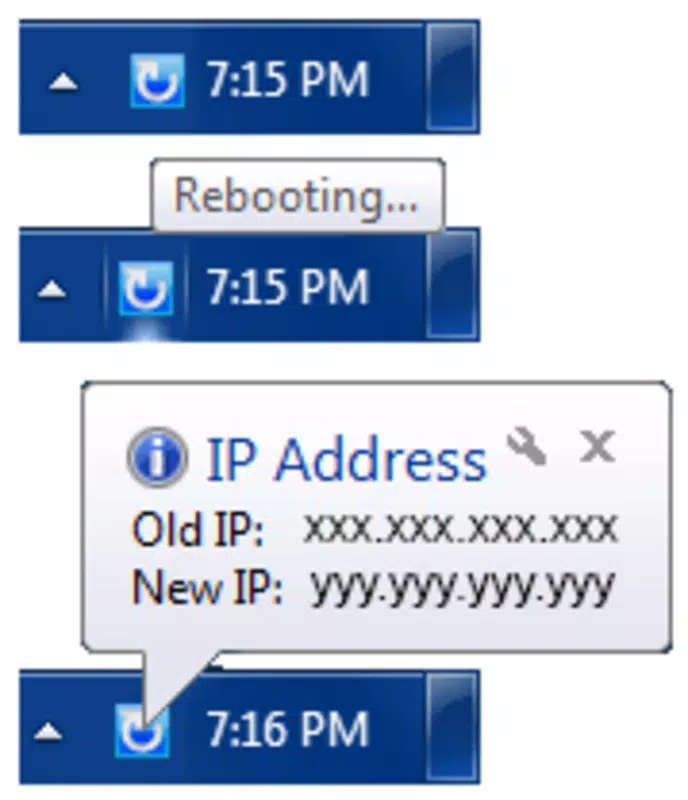
- IP Address Notifications: After a reboot, the app displays both the previous and new IP addresses assigned to the device. This feature provides immediate feedback, helping users verify connectivity and troubleshoot issues quickly.
- User-Friendly Interface: Designed with simplicity in mind, the interface avoids technical jargon and complex settings. Even users with minimal networking knowledge can navigate the app and perform essential actions with confidence.
- Remote Access Capability: The app enables users to restart their router from any location within the same network. This is especially useful for individuals with routers placed in basements, closets, or distant rooms.
For example, a remote worker experiencing slow internet speeds can use Auto Reboot to restart the router from their desk, avoiding the need to walk to another room. Similarly, a user managing multiple devices across a home network can quickly restore connectivity after a service interruption. The app’s straightforward design ensures that functionality is accessible without requiring technical expertise.
Interface, UX & Performance
Auto Reboot features a clean, minimal interface that prioritizes usability over visual complexity. The layout is intuitive, with clearly labeled buttons and immediate access to core functions. Navigation is linear and consistent, allowing users to perform actions with minimal steps. The app avoids clutter, focusing only on essential controls such as the restart button and IP address display.
Visual style is functional rather than decorative, using standard Android UI components that align with platform guidelines. This ensures compatibility with various screen sizes and Android versions. The responsiveness of the interface appears to be consistent, with quick feedback after each action. Although the developer did not list formal performance metrics, the app’s small size (1.8 MB) suggests efficient resource usage and low impact on device performance.
Stability is likely maintained due to the app’s long-standing presence in the Android ecosystem. The lack of reported crashes or compatibility issues in public records indicates reliable operation. Users can expect consistent behavior across different device categories, including smartphones and tablets, though specific performance benchmarks were not disclosed.
Platform Compatibility & Technical Requirements
Auto Reboot is available exclusively on the Android platform. The current version is 1.0.0, and the app has a file size of 1.8 MB, indicating a lightweight footprint. The developer did not specify minimum OS requirements, so compatibility with older Android versions cannot be confirmed. However, given the app’s release date in 2012 and its continued availability, it may support a broad range of Android devices.
Users should ensure their device is running a version of Android that supports the app’s core functionality. Since the app relies on network communication with the router, it must be connected to the same local network. Specific hardware or network configuration requirements were not listed by the developer. For optimal performance, users are advised to maintain a stable Wi-Fi connection during reboot operations.
Pros and Cons
Pros
- Simple, intuitive interface suitable for non-technical users.
- One-click router restart eliminates physical interaction.
- Provides real-time feedback with IP address tracking.
- Lightweight design with minimal storage usage (1.8 MB).
- Free to download and use with no in-app purchases.
Cons
- Compatibility with specific Android versions was not disclosed.
- Only available on Android, with no iOS or other platform support.
- Does not include advanced networking features like port forwarding or bandwidth monitoring.
- Remote management is limited to the same local network.
- Developer information beyond the name is not publicly available.
FAQ
Is Auto Reboot safe to use?
Yes, the app operates within the constraints of standard network communication and does not require elevated permissions. It functions by sending commands over the local network, making it secure when used on trusted networks.
Can I use Auto Reboot on iOS devices?
No, the app is currently only available for Android. There is no official version for iOS or other platforms.
Does Auto Reboot require root access?
No, the app does not require root privileges. It operates using standard Android network permissions and works on non-rooted devices.
How often can I restart my router using this app?
There is no built-in limit. Users can restart their router as frequently as needed, though frequent reboots may impact network stability.
What should I do if the app doesn’t respond during a reboot?
Ensure your device is connected to the same network as the router. Restarting the app or your device may resolve temporary connectivity issues.
Final Thoughts
Auto Reboot remains a reliable, no-nonsense solution for users seeking to simplify router management. Its minimalist design, one-click functionality, and IP address tracking make it a valuable tool for maintaining stable internet connectivity. While it lacks advanced features, its focus on core usability ensures it delivers on its promise without bloat.
It is especially beneficial for remote workers, home office users, and anyone with a router located in an inconvenient spot. The app’s free status and small size further enhance its appeal. For those looking for a secure, straightforward way to manage their network, Auto Reboot offers practical value without complexity.
Download Auto Reboot now


